在上一章中,我们编写了一些 Kotlin 代码来计算圆的周长。在本章中,我们将编写一些函数,让计算任意圆的周长变得轻而易举!
函数
正如上一章所见,计算圆的周长很简单:
下面是我们编写的用于做该计算的 Kotlin 代码:
val pi = 3.14
var radius = 5.2
val circumference = 2 * pi * radius这段代码计算了半径为 5.2 的圆的周长。但当然,并非所有圆的半径都是 5.2!如果我们还想求半径为 6.7 或 10.0 的圆的周长,该怎么办?
嗯,我们当然可以把方程式写好多遍。
val pi = 3.14

var radius = 5.2
val circumferenceOfSmallCircle = 2 * pi * radius

radius = 6.7
val circumferenceOfMediumCircle = 2 * pi * radius

radius = 10.0
val circumferenceOfLargeCircle = 2 * pi * radius这虽然可行,但哇——看看我们不得不把同样的东西打了一遍又一遍!
当我们像这样反复写相同的代码时,我们称之为重复。在大多数情况下,重复的代码是有害的,因为:
- 当你多次输入相同内容时,更容易在某次输入时出错。例如,你可能不小心输入
3 * pi radius。 - 如果你想修改这个公式,必须找到所有输入过它的地方,并确保每一处都更新。
- 当你的眼睛在屏幕上一遍遍看到相同内容时,阅读会变得更加困难。
让我们修改代码,使我们只需写一次 2 * pi * radius,然后用它来计算任意圆的周长。换句话说,我们来消除重复!
使用函数消除重复
虽然我们写了三次 2 * pi * radius,但每次实际变化的只有 radius 的值。换句话说,2 从未改变,pi 也从未改变(每次都等于 3.14)。但 radius 的值每次都不同:第一次是 5.2,然后是 6.7,再然后是 10.0。
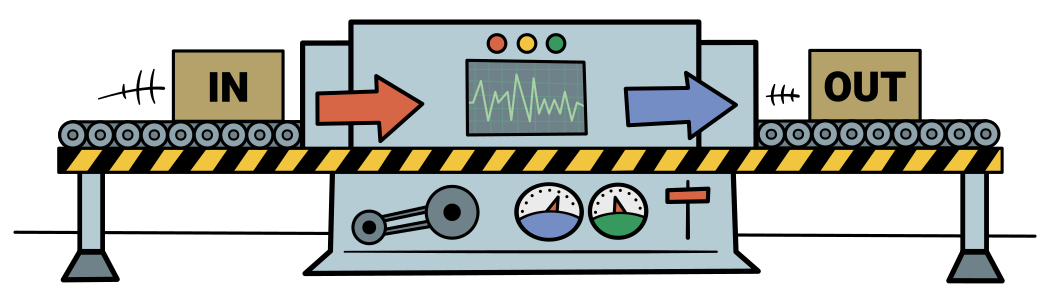
既然每次变化的只有半径,如果我们能把半径直接转换成周长就太棒了。换句话说,如果我们能建造一台机器,在一侧放入半径,另一侧弹出周长,岂不完美?
- 由于我们在放入半径,我们可以称其为输入。
- 而周长从另一侧出来,我们可以称其为输出。
现在,我们不会创建一台真正的机器,而是会创建一个函数,它将完全按照我们的意愿工作——我们给它一个半径,它返回一个周长!
函数基础
创建函数
下面是在 Kotlin 中编写一个简单函数的方式:
看起来很多,但其实只有几个部分,而且都很容易理解。
fun是一个关键字(就像val和var是关键字一样)。它告诉 Kotlin 你正在编写一个函数。circumference是我们函数的名称。我们可以随意命名函数,但这里我选择了circumference。(radius: Double)表示该函数有一个名为radius的输入,其类型为Double。我们称radius为该函数的形参。- 右括号后的
: Double表示函数的输出类型为Double。这称为函数的返回类型。 2 * pi * radius称为函数的函数体。无论该表达式求值为何值,都将是函数的输出。该输出的值称为函数的结果,它就是从机器中出来的东西。请注意,该表达式的求值结果必须与返回类型所指定的类型相同。在本例中,2 * pi * radius必须求值为Double,否则就会出错。
让我们将函数与我们上面设想的机器进行比较:
你可能还记得上一章提到,通常不需要指定变量的类型,而是让 Kotlin 使用其类型推断。编写这样的函数时同样可以使用类型推断。只需省略返回类型,如下所示:
fun circumference(radius: Double) = 2 * pi * radiusKotlin 程序员通常会对像这样的简单函数使用类型推断。
现在我们已经创建了函数,是时候使用它了!
调用函数
当你使用函数——也就是向机器中放入某些东西时——这称为调用或调用(invoke)该函数。调用它的地方称为调用代码或调用点。
以下是在 Kotlin 中调用函数的方式:
circumferenceOfSmallCircle是一个将保存函数调用结果的变量(即从机器中出来的值)。circumference是我们正在调用的函数的名称。- 值
5.2是该函数的实参——它是我们放入机器的东西。当我们使用实参调用函数时,有时会说我们在向函数传递实参。
从现在起,我通常会在函数名后加上括号。例如,我会写成
circumference()而不是circumference。这样做是为了清楚地表明我指的是一个函数。
调用函数时会发生什么?假设我们编写了一个函数并调用它,如下所示:
fun circumference(radius: Double) = 2 * pi * radius

val circumferenceOfSmallCircle = circumference(5.2)当我们调用该函数时,就像是把函数体 2 * pi * radius 直接嵌入到函数调用 circumference(5.2) 所在的位置。
你可以把它想象成这样:
fun circumference(radius: Double) = 2 * pi * radius

val circumferenceOfSmallCircle = 2 * pi * radius然后,由于我们传入了 5.2 作为半径,可以想象将 5.2 代入嵌入的 radius:
fun circumference(radius: Double) = 2 * pi * radius

val circumferenceOfSmallCircle = 2 * pi * 5.2总结一下,当我们调用 circumference(5.2) 时,就如同在同一位置写下了 2 * pi * 5.2。
现在我们有了一个可以根据半径计算周长的函数,我们可以根据需要多次调用它!
val pi = 3.14
fun circumference(radius: Double) = 2 * pi * radius

val circumferenceOfSmallCircle = circumference(5.2)
val circumferenceOfMediumCircle = circumference(6.7)
val circumferenceOfLargeCircle = circumference(10.0)这比示例 2.2看起来更好吧?因为我们有了函数,就不需要一遍遍地写 2 * pi * radius!而是为每个圆调用一次 circumference() 函数。
实参与形参:有什么区别?
很容易将实参和形参混淆,因此理解两者的区别很重要:
- 实参是你传递给函数的值。例如,你可能向
circumference()函数传入5.2。实参就是5.2。 - 形参是函数内部用于保存该值的变量。例如,当你向
circumference()传入5.2时,它被赋给名为radius的形参。
想要一种容易记住两者区别的方法,请查看这个助记技巧。
拥有多个参数的函数
circumference() 函数只有一个形参,即 radius,但有时你可能需要拥有更多形参的函数。我们来创建一个拥有两个形参的函数!
即使距离上物理课已经有一段时间了,你大概也知道如何计算速度。它很容易记住,因为我们经常说——“限速100公里每小时”。
“公里每小时”就是距离(“公里”)除以(“每”)时间(“小时”)。
在 Kotlin 中,用正斜杠表示除法。你可以把它想象成一个向左倒下的分数:
先来写一些简单代码,计算一辆行驶了 321.8 公里、用时 4.15 小时的汽车的平均速度。
val distance = 321.8
val time = 4.15
val speed = distance / time现在,让我们把 distance / time 表达式变成一个函数。要创建计算速度的函数,我们需要知道两件事:distance(距离)和 time(时间)。
在 Kotlin 中,当你需要一个带有两个形参的函数时,只需用逗号分隔这些形参,如下所示:
fun speed(distance: Double, time: Double) = distance / time调用该函数时,实参同样用逗号分隔。例如,我们可以用上面相同的值调用 speed() 函数,用逗号分隔这些值:
val averageSpeed = speed(321.8, 4.15)结果约为 77.54 公里每小时。
注意,这里的实参顺序与形参的顺序相同。
- 由于
321.8是第一个实参,321.8将被赋给第一个形参,即distance。 - 由于
4.15是第二个实参,4.15将被赋给第二个形参,即time。
换句话说,以这种方式调用函数时,实参的位置很重要,这就是为什么我们有时将这类实参称为位置实参。
但这并不是向函数传递实参的唯一方式!
具名参数
与其依赖实参的位置,你可以改用形参的名称,如下所示:
val averageSpeed = speed(distance = 321.8, time = 4.15)这些称为具名参数。具名参数的好处是顺序无关紧要。因此,你可以像这样以不同顺序传入参数来调用函数:
val averageSpeed = speed(time = 4.15, distance = 321.8)换句话说,这五个函数调用将得到完全相同的结果:
val averageSpeed1 = speed(321.8, 4.15)
val averageSpeed2 = speed(distance = 321.8, 4.15)
val averageSpeed3 = speed(321.8, time = 4.15)
val averageSpeed4 = speed(distance = 321.8, time = 4.15)
val averageSpeed5 = speed(time = 4.15, distance = 321.8)默认参数
在某些情况下,你可能会发现自己一遍遍地向函数传递相同的实参值。例如,也许你正在计算以下各人的速度:
- 一个人在步行
- 另一个人在骑自行车
- 第三个人在开车,以及
- 第四个人在乘飞机。
除了飞机只用了1.5小时到达目的地,其他所有人都行进了2.0小时。使用上面的 speed() 函数,你可以这样计算速度:
val walkingSpeed = speed(10.2, 2.0)
val bikingSpeed = speed(29.6, 2.0)
val drivingSpeed = speed(225.3, 2.0)
val flyingSpeed = speed(1368.747, 1.5)与其反复为 time 形参传入 2.0,不如在定义函数时将 2.0 设为默认参数。
让我们更新 speed() 函数,使 time 形参默认为 2.0。
fun speed(distance: Double, time: Double = 2.0) = distance / time现在,当 time 应等于 2.0 时,我们可以省略它的实参,如下所示:
val walkingSpeed = speed(10.2)
val bikingSpeed = speed(29.6)
val drivingSpeed = speed(225.3)
val flyingSpeed = speed(1368.747, 1.5)对于步行、骑行和驾车,我们省略了 time 实参,因此它们默认为 2.0。但对于飞行,我们传入了 1.5。示例 2.16 的结果与示例 2.14 完全相同。
简单!
但是,如果你想为第一个形参而不是第二个形参设置默认参数,会发生什么?
当默认参数排在最前时
我们的步行者、骑行者、驾车者和飞行员又出发了。但这次是一场比赛!谁先到达 42.195 公里外的终点线谁就获奖。
除了飞机在起飞前爆胎之外,所有人都完成了比赛:
val walkingSpeed = speed(42.195, 8.27)
val bikingSpeed = speed(42.195, 2.85)
val drivingSpeed = speed(42.195, 0.37)
val flyingSpeed = speed(0.12, 0.01)不设置默认 time,而是设置默认 distance 为 42.195:
fun speed(distance: Double = 42.195, time: Double) = distance / time由于步行者、骑行者和驾车者行驶的距离相同,我们应该能省略第一个形参 distance 的值。你可能会想这样调用函数:
val walkingSpeed = speed(8.27)
val bikingSpeed = speed(2.85)
val drivingSpeed = speed(0.37)
val flyingSpeed = speed(0.12, 0.01)但这会导致错误:No value passed for parameter 'time'(未传入形参 'time' 的值)。为什么会这样?
由于我们使用的是位置实参,实际上我们省略的是 time 而不是 distance。
换句话说,我们想要将 8.27 赋给 time 形参,如下所示:
但我们实际上将 8.27 赋给了 distance 形参,因为 8.27 是第一个实参,而 distance 是第一个形参:
要告诉 Kotlin 我们传入的是 time,只需使用具名参数,如下所示:
val walkingSpeed = speed(time = 8.27)
val bikingSpeed = speed(time = 2.85)
val drivingSpeed = speed(time = 0.37)
val flyingSpeed = speed(0.12, 0.01)现在,当我们为步行、骑行和驾车调用 speed() 时,第一个形参 distance 将默认为 42.195。
表达式函数体与代码块函数体
到目前为止,我们编写的函数只是对一个表达式求值。
- 我们的
circumference()函数只是对2 * pi * radius求值 - 我们的
speed()函数只是对distance / time求值
让我们再看一看 circumference() 的代码:
val pi = 3.14

fun circumference(radius: Double) = 2 * pi * radius当我们用这种方式编写函数,即函数体只有一个单一表达式时,我们说该函数具有表达式函数体。
Kotlin 还给了我们编写函数的第二种方式。让我们用第二种方式重写 circumference() 函数:
val pi = 3.14

fun circumference(radius: Double): Double {
    return 2 * pi * radius
}当我们这样编写函数时,我们称其为具有代码块函数体的函数。
用代码块函数体编写函数的方式比我们目前编写表达式函数体函数的方式稍微复杂一些,让我们仔细看看新增的内容:
首先,注意括号后的 : Double。对于表达式函数体,我们可以使用类型推断;但使用代码块函数体时,我们必须显式指定返回类型。
接下来,注意左右大括号:{ 和 }。两个大括号之间的所有内容称为代码块(这就是为什么我们称其为具有代码块函数体的函数!)
最后,注意代码块内的 return。return 是一个关键字,告诉 Kotlin 其后的表达式就是函数应返回的值。与表达式函数体一样,函数返回的值必须与我们声明的函数返回类型匹配!
代码块函数体的写法比表达式函数体需要输入更多内容,那么我们为什么要使用它呢?
例如,到目前为止,我们把 pi 定义在函数的外部。但如果能把它定义在函数内部就更好了:
fun circumference(radius: Double): Double {
	val pi = 3.14
	return 2 * pi * radius
}像这样将 pi 移到函数内部后,它只能在函数内部访问。换句话说,如果你试图在函数外部使用它,就会得到错误。
fun circumference(radius: Double): Double {
	val pi = 3.14
	return 2 * pi * radius
}

val tau = 2 * pi在本课程的其余部分,我们将看到许多表达式函数体和代码块函数体的示例。
没有返回值的函数
有时你可能需要一个不返回结果的函数。例如,假设我们有一个随时间增加的变量,名为 counter。我们将创建一个名为 increment() 的函数。每次调用该函数时,它都会通过编写语句 counter = counter + 1 将 counter 增加1。
具有表达式函数体的函数只能包含单个表达式。我们不能在表达式函数体中使用语句。例如,我们不能这样做:
var counter = 0

fun increment() = counter = counter + 1不使用表达式函数体,而应为该函数改用代码块函数体:
var counter = 0

fun increment() {
    counter = counter + 1
}你可能注意到我们没有为该函数指定返回类型。
你可能会惊讶地发现,尽管我们没有指定返回类型,尽管该函数不含表达式,该函数仍然返回一个值!
没错!当你省略具有代码块函数体的函数的返回类型时,它会自动返回一个名为 Unit 的特殊 Kotlin 类型。
Unit——它不是数字也不是字符串,用途有限。但在某些情况下它会很有用,我们将在未来章节介绍泛型时探讨。
但现在,让我们结束当前章节!
总结
在本章中,我们学习了:
- 函数是什么,以及它如何帮助我们消除代码中的重复。
- 函数形参是什么,以及它与函数调用的实参有何不同。
- 位置实参与具名实参的区别。
- 如何为参数设置默认值。
- 表达式函数体与代码块函数体的区别。
- 当函数没有有意义的结果可返回时,Kotlin 如何使用
Unit类型。
接下来,在第3章中,我们将学习 Kotlin 中所有关于条件语句的知识,以便让代码在不同情况下执行不同操作。到时见!
感谢 Louis CAD、James Lorenzen、Matt McKenna 和 Charles Muchene 对本章的审阅。
