音视频
音频
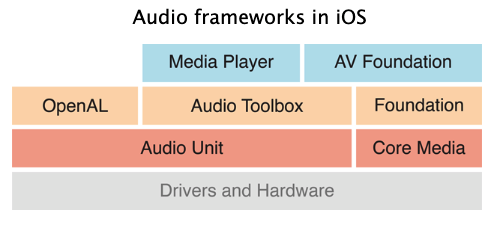
如图所示,在iOS平台上,所有的音频框架底层都是基于AudioUnit实现的。较高层次的音频框架包括:MediaPlayer、AVFoundation、OpenAL和AudioToolBox,这些框架都封装了AudioUnit,为特定的任务提供专用且简化的 API。
在iOS开发中,主要可以使用五种⽅式来播放音频:
- System Sound Services :系统声音服务。使用AudioToolbox播放。主要用于播放短促的音效,官方要求不超过30秒。音频文件格式主要是
.caf、.aif、.wav等。注意,这种方式直接使用的C语言接口,API都是C语言的函数,性能高,但播放方式单一,同一时刻只能播放一个音频,且不能控制播放的进度,没有循环播放和立体声控制,只能使用系统音量,不能修改播放音量。 - AVAudioPlayer :高级音频播放器,是
AVFoundation.framework中定义的一个类。它支持广泛的音频格式,可以播放任意长度的音频文件、支持循环播放、可以同步播放多个音频文件、控制播放进度以及从音频文件的任意一点开始播放等。但要注意,相比AudioToolbox,它消耗更多内存,且只能播放本地音频,无法播放在线音频。 - AVPlayer:通常用来播放网络音乐和网络视频。它支持流媒体播放,并且可以自己缓存网络数据,因此可用来做边下别播功能。
- Audio Queue Services: 播放和录制音频服务。主要用来播放音频,录音,它比较底层,会有更多的控制权。
- OpenAL:跨平台开源的音频处理接口。它与图形处理的 OpenGL类似,它为音频播放提供了一套更加优化的方案。最适合开发游戏的音效。
AudioToolbox
是一套基于 C 语言的框架,本质是将短音频注册到系统的声音服务中来播放
- (void)viewDidLoad {
    [super viewDidLoad];

    NSString *path = [[NSBundle mainBundle] pathForResource:@"pistol.wav" ofType:nil];
    if(path){
        NSURL *url = [NSURL fileURLWithPath:path];
        OSStatus err = AudioServicesCreateSystemSoundID((__bridge CFURLRef)url, &soundId);

        if(err != kAudioServicesNoError){
            NSLog(@"Could not load %@,error code is %d",url,err);
        }
    }else{
        NSLog(@"Could not load %@",path);
    }
}


- (IBAction)play:(UIButton *)sender {
    if(soundId != 0){
        AudioServicesPlaySystemSound(soundId);

        // 带回调的播放接口
//        AudioServicesPlaySystemSoundWithCompletion(soundId, ^{
//            NSLog(@"播放完成");
//            AudioServicesDisposeSystemSoundID(soundId);
//        });
    }
}
除了直接使用AudioServicesPlaySystemSound函数播放,还可以使用带有回调的函数播放,总结如下:
AudioServicesPlaySystemSound:无震动无回调的播放AudioServicesPlaySystemSoundWithCompletion:无震动有回调的播放AudioServicesPlayAlertSound:有震动无回调的播放AudioServicesPlayAlertSoundWithCompletion:有震动有回调的播放
此外,还可以调用AudioServicesPlaySystemSound(kSystemSoundID_Vibrate);单独发出震动
预定义的声音
系统已经预定义了一些音效,其ID在1000到2000范围内(十进制),如下表所示(从2.0到5.0测试版)。这些系统声音都储存在/System/Library/Audio/UISounds/。
| Sound ID | 文件名 (iPhone) | 类别 | 注释 |
|---|---|---|---|
| 1000 | new-mail.caf | MailReceived | |
| 1001 | mail-sent.caf | MailSent | |
| 1002 | Voicemail.caf | VoicemailReceived | |
| 1003 | ReceivedMessage.caf | SMSReceived | |
| 1004 | SentMessage.caf | SMSSent | |
| 1005 | alarm.caf | CalendarAlert | |
| 1006 | low_power.caf | LowPower | |
| 1007 | sms-received1.caf | SMSReceived_Alert | |
| 1008 | sms-received2.caf | SMSReceived_Alert | |
| 1009 | sms-received3.caf | SMSReceived_Alert | |
| 1010 | sms-received4.caf | SMSReceived_Alert | |
| 1011 | - | SMSReceived_Vibrate | |
| 1012 | sms-received1.caf | SMSReceived_Alert | |
| 1013 | sms-received5.caf | SMSReceived_Alert | |
| 1014 | sms-received6.caf | SMSReceived_Alert | |
| 1015 | Voicemail.caf | - | Available since 2.1 |
| 1016 | tweet_sent.caf | SMSSent | Available since 5.0 |
| 1020 | Anticipate.caf | SMSReceived_Alert | Available since 4.2 |
| 1021 | Bloom.caf | SMSReceived_Alert | Available since 4.2 |
| 1022 | Calypso.caf | SMSReceived_Alert | Available since 4.2 |
| 1023 | Choo_Choo.caf | SMSReceived_Alert | Available since 4.2 |
| 1024 | Descent.caf | SMSReceived_Alert | Available since 4.2 |
| 1025 | Fanfare.caf | SMSReceived_Alert | Available since 4.2 |
| 1026 | Ladder.caf | SMSReceived_Alert | Available since 4.2 |
| 1027 | Minuet.caf | SMSReceived_Alert | Available since 4.2 |
| 1028 | News_Flash.caf | SMSReceived_Alert | Available since 4.2 |
| 1029 | Noir.caf | SMSReceived_Alert | Available since 4.2 |
| 1030 | Sherwood_Forest.caf | SMSReceived_Alert | Available since 4.2 |
| 1031 | Spell.caf | SMSReceived_Alert | Available since 4.2 |
| 1032 | Suspense.caf | SMSReceived_Alert | Available since 4.2 |
| 1033 | Telegraph.caf | SMSReceived_Alert | Available since 4.2 |
| 1034 | Tiptoes.caf | SMSReceived_Alert | Available since 4.2 |
| 1035 | Typewriters.caf | SMSReceived_Alert | Available since 4.2 |
| 1036 | Update.caf | SMSReceived_Alert | Available since 4.2 |
| 1050 | ussd.caf | USSDAlert | |
| 1051 | SIMToolkitCallDropped.caf | SIMToolkitTone | |
| 1052 | SIMToolkitGeneralBeep.caf | SIMToolkitTone | |
| 1053 | SIMToolkitNegativeACK.caf | SIMToolkitTone | |
| 1054 | SIMToolkitPositiveACK.caf | SIMToolkitTone | |
| 1055 | SIMToolkitSMS.caf | SIMToolkitTone | |
| 1057 | Tink.caf | PINKeyPressed | |
| 1070 | ct-busy.caf | AudioToneBusy | 在4.0之前没有这个声音的类别 |
| 1071 | ct-congestion.caf | AudioToneCongestion | 在4.0之前没有这个声音的类别 |
| 1072 | ct-path-ack.caf | AudioTonePathAcknowledge | 在4.0之前没有这个声音的类别 |
| 在4.0之前没有这个声音的类别 | |||
| 1074 | ct-call-waiting.caf | AudioToneCallWaiting | 在4.0之前没有这个声音的类别 |
| 1075 | ct-keytone2.caf | AudioToneKey2 | 在4.0之前没有这个声音的类别 |
| 1100 | lock.caf | ScreenLocked | |
| 1101 | unlock.caf | ScreenUnlocked | |
| 1102 | - | FailedUnlock | |
| 1103 | Tink.caf | KeyPressed | |
| 1104 | Tock.caf | KeyPressed | |
| 1105 | Tock.caf | KeyPressed | |
| 1106 | beep-beep.caf | ConnectedToPower | |
| 1107 | RingerChanged.caf | RingerSwitchIndication | |
| 1108 | photoShutter.caf | CameraShutter | |
| 1109 | shake.caf | ShakeToShuffle | Available since 3.0 |
| 1110 | jbl_begin.caf | JBL_Begin | Available since 3.0 |
| 1111 | jbl_confirm.caf | JBL_Confirm | Available since 3.0 |
| 1112 | jbl_cancel.caf | JBL_Cancel | Available since 3.0 |
| 1113 | begin_record.caf | BeginRecording | Available since 3.0 |
| 1114 | end_record.caf | EndRecording | Available since 3.0 |
| 1115 | jbl_ambiguous.caf | JBL_Ambiguous | Available since 3.0 |
| 1116 | jbl_no_match.caf | JBL_NoMatch | Available since 3.0 |
| 1117 | begin_video_record.caf | BeginVideoRecording | Available since 3.0 |
| 1118 | end_video_record.caf | EndVideoRecording | Available since 3.0 |
| 1150 | vc~invitation-accepted.caf | VCInvitationAccepted | Available since 4.0 |
| 1151 | vc~ringing.caf | VCRinging | Available since 4.0 |
| 1152 | vc~ended.caf | VCEnded | Available since 4.0 |
| 1153 | ct-call-waiting.caf | VCCallWaiting | Available since 4.1 |
| 1154 | vc~ringing.caf | VCCallUpgrade | Available since 4.1 |
| 1200 | dtmf-0.caf | TouchTone | |
| 1201 | dtmf-1.caf | TouchTone | |
| 1202 | dtmf-2.caf | TouchTone | |
| 1203 | dtmf-3.caf | TouchTone | |
| 1204 | dtmf-4.caf | TouchTone | |
| 1205 | dtmf-5.caf | TouchTone | |
| 1206 | dtmf-6.caf | TouchTone | |
| 1207 | dtmf-7.caf | TouchTone | |
| 1208 | dtmf-8.caf | TouchTone | |
| 1209 | dtmf-9.caf | TouchTone | |
| 1210 | dtmf-star.caf | TouchTone | |
| 1211 | dtmf-pound.caf | TouchTone | |
| 1254 | long_low_short_high.caf | Headset_StartCall | |
| 1255 | short_double_high.caf | Headset_Redial | |
| 1256 | short_low_high.caf | Headset_AnswerCall | |
| 1257 | short_double_low.caf | Headset_EndCall | |
| 1258 | short_double_low.caf | Headset_CallWaitingActions | |
| 1259 | middle_9_short_double_low.caf | Headset_TransitionEnd | |
| 1300 | Voicemail.caf | SystemSoundPreview | |
| 1301 | ReceivedMessage.caf | SystemSoundPreview | |
| 1302 | new-mail.caf | SystemSoundPreview | |
| 1303 | mail-sent.caf | SystemSoundPreview | |
| 1304 | alarm.caf | SystemSoundPreview | |
| 1305 | lock.caf | SystemSoundPreview | |
| 1306 | Tock.caf | KeyPressClickPreview | 在3.2之前,该类别是SystemSoundPreview |
| 1307 | sms-received1.caf | SMSReceived_Selection | |
| 1308 | sms-received2.caf | SMSReceived_Selection | |
| 1309 | sms-received3.caf | SMSReceived_Selection | |
| 1310 | sms-received4.caf | SMSReceived_Selection | |
| 1311 | - | SMSReceived_Vibrate | |
| 1312 | sms-received1.caf | SMSReceived_Selection | |
| 1313 | sms-received5.caf | SMSReceived_Selection | |
| 1314 | sms-received6.caf | SMSReceived_Selection | |
| 1315 | Voicemail.caf | SystemSoundPreview | Available since 2.1 |
| 1320 | Anticipate.caf | SMSReceived_Selection | Available since 4.2 |
| 1321 | Bloom.caf | SMSReceived_Selection | Available since 4.2 |
| 1322 | Calypso.caf | SMSReceived_Selection | Available since 4.2 |
| 1323 | Choo_Choo.caf | SMSReceived_Selection | Available since 4.2 |
| 1324 | Descent.caf | SMSReceived_Selection | Available since 4.2 |
| 1325 | Fanfare.caf | SMSReceived_Selection | Available since 4.2 |
| 1326 | Ladder.caf | SMSReceived_Selection | Available since 4.2 |
| 1327 | Minuet.caf | SMSReceived_Selection | Available since 4.2 |
| 1328 | News_Flash.caf | SMSReceived_Selection | Available since 4.2 |
| 1329 | Noir.caf | SMSReceived_Selection | Available since 4.2 |
| 1330 | Sherwood_Forest.caf | SMSReceived_Selection | Available since 4.2 |
| 1331 | Spell.caf | SMSReceived_Selection | Available since 4.2 |
| 1332 | Suspense.caf | SMSReceived_Selection | Available since 4.2 |
| 1333 | Telegraph.caf | SMSReceived_Selection | Available since 4.2 |
| 1334 | Tiptoes.caf | SMSReceived_Selection | Available since 4.2 |
| 1335 | Typewriters.caf | SMSReceived_Selection | Available since 4.2 |
| 1336 | Update.caf | SMSReceived_Selection | Available since 4.2 |
| 1350 | - | RingerVibeChanged | |
| 1351 | - | SilentVibeChanged | |
| 4095 | - | Vibrate | 在 2.2 之前没有这个声音的类别。在 SDK 中这是常数 kSystemSoundID_Vibrate |
AVAudioPlayer
从文件或缓冲区播放音频数据的对象。
- (IBAction)play:(UIButton *)sender {
    [player play];
}

-(void)initAudioPlayer{
    NSString *path = [[NSBundle mainBundle] pathForResource:@"music.mp3" ofType:nil];
    if(path){
        NSURL *audioURL = [NSURL fileURLWithPath:path];
        player = [[AVAudioPlayer alloc]initWithContentsOfURL:audioURL error:nil];
        // 设置音量
        player.volume = 0.5f;
        // 准备播放
        [player prepareToPlay];
    }
}
初始化一个AVAudioPlayer有四种方式:
initWithContentsOfURL:(NSURL *)url error:(NSError * _Nullable *)outError;initWithContentsOfURL:(NSURL *)url fileTypeHint:(NSString *)utiString error:(NSError * _Nullable *)outError;initWithData:(NSData *)data error:(NSError * _Nullable *)outError;initWithData:(NSData *)data fileTypeHint:(NSString *)utiString error:(NSError * _Nullable *)outError;
主要是通过文件路径(NSURL)来初始化,或者通过音频数据(NSData)来初始化。另外也可以指定音频文件的UTI类型。
AVAudioPlayer对象的一些常用方法:
- (BOOL)prepareToPlay:将音频数据提前加载到缓冲区- (BOOL)play:可异步开始播放音频- (BOOL)playAtTime:(NSTimeInterval)time:在指定时刻开始播放音频。可设置成当前时间之后的多少秒播放- (void)pause:暂停播放- (void)stop:停止播放。会撤销prepareToPlay所做的准备
AVAudioPlayer对象的一些属性:
playing:当前是否正在播放音频,返回一个BOOL值volume:获取当前播放的音量大小,范围为浮点数0~1之间pan:设置用哪个扬声器播放。-1.0表示只使用左扬声器,1.0表示只使用右扬声器,0.0表示同时使用左右扬声器。rate:设置播放速度,取值范围是0.5~2.0。默认为1.0,表示正常的播放速度。0.5表示半速。2.0表示两倍。在使用此属性之前,必须先调用enableRate启用播放速度功能enableRate:开启播放速度。在创建播放器之后,调用prepareToPlay之前,将这个属性设置为YESnumberOfLoops:设置循环播放的次数。例如设置为1,表示在播放结束之后,再播放一次。 如果设置为负数,表示一直循环delegate:设置代理
需要注意,如果我们想监听播放过程的一些回调,可以在当前类中遵守AVAudioPlayerDelegate协议,并设置代理。目前该协议中许多接口已过时,可用的只有两个回调函数:
- (void)audioPlayerDidFinishPlaying:(AVAudioPlayer *)player successfully:(BOOL)flag:音频播放完毕后回调此方法- (void)audioPlayerDecodeErrorDidOccur:(AVAudioPlayer *)player error:(NSError *)error:在播放过程中遇到解码错误时回调
AVPlayer
使用和AVAudioPlayer很类似,可用于播放本地或在线的音视频:
NSURL *url = [NSURL URLWithString:@"http://music.163.com/song/media/outer/url?id=1426649237.mp3"];

AVPlayerItem *item = [[AVPlayerItem alloc]initWithURL:url];
player = [[AVPlayer alloc]initWithPlayerItem:item];
[player play];
需要注意的是,iOS中限制了http请求。如果你是https请求可以忽略,否则需要配置允许http请求。打开项目的Info.plist文件,添加如下配置:
    <key>NSAppTransportSecurity</key>
    <dict>
        <key>NSAllowsArbitraryLoads</key>
        <true/>
    </dict>
视频
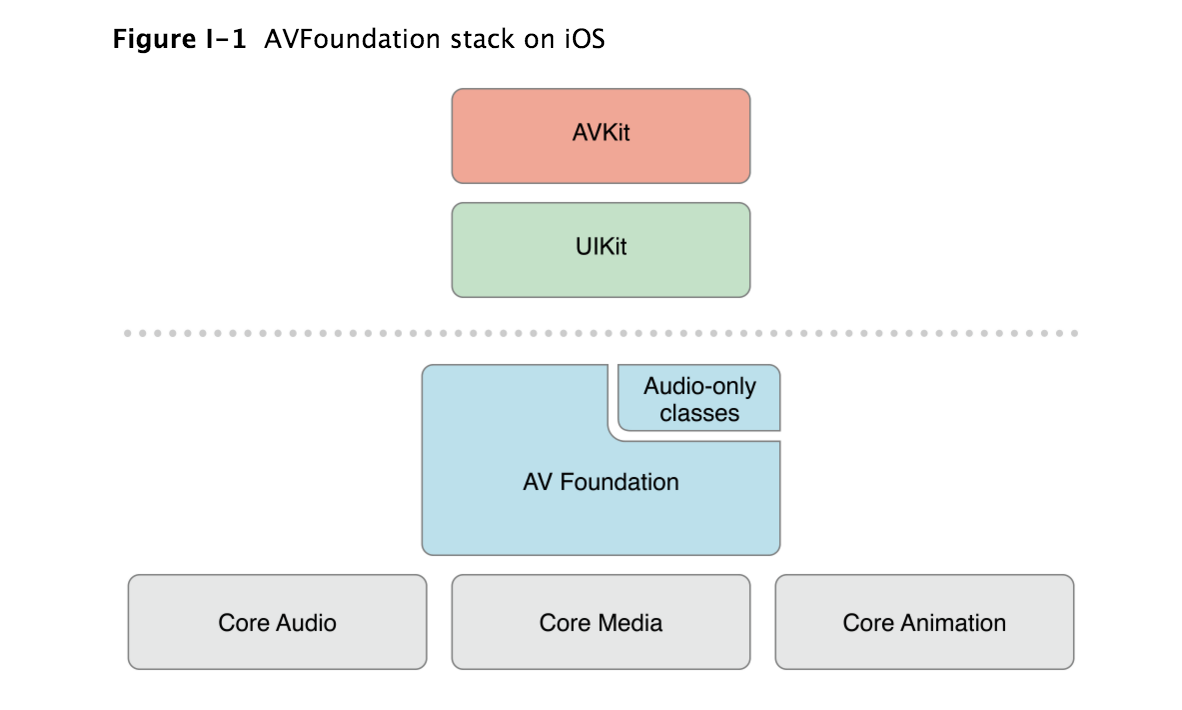
- MediaPlayer:iOS9被被苹果废弃
- AVPlayer:它只提供单纯的播放,需要自定义UI进行控制(进度,暂停,播放等按钮)
    NSURL *url = [NSURL URLWithString:@"https://v-cdn.zjol.com.cn/276996.mp4"];
    AVPlayer *player = [AVPlayer playerWithURL:url];
    AVPlayerLayer *layer = [AVPlayerLayer playerLayerWithPlayer:player];
    layer.frame = CGRectMake(0, 0, self.view.bounds.size.width, self.view.bounds.size.height*9/16);

    [self.view.layer addSublayer:layer];
    [player play];
公众号“编程之路从0到1”