布局小案例
案例一
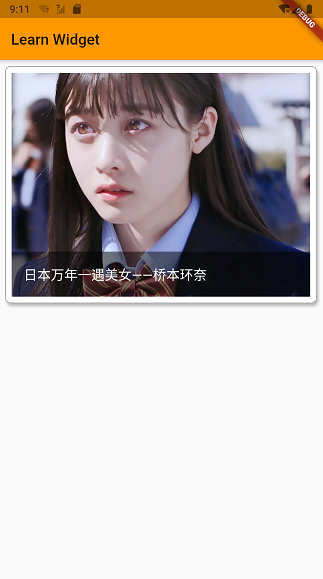
            Container(
              margin: const EdgeInsets.all(8.0),
              padding: const EdgeInsets.all(8.0),
              child: AspectRatio(
                  aspectRatio: 4 / 3,
                  child: Stack(
                    fit: StackFit.expand,
                    children: <Widget>[
                      Image.network(
                        'https://c-ssl.duitang.com/uploads/item/201810/07/20181007131933_qhjkl.thumb.1000_0.jpg',
                        fit: BoxFit.cover,
                      ),
                      Align(
                        alignment: Alignment.bottomCenter,
                        child: Container(
                          padding: const EdgeInsets.only(left: 16),
                          alignment: Alignment.centerLeft,
                          height: 60,
                          // width: double.infinity,
                          color: Color.fromRGBO(0, 0, 0, 0.5),
                          child: Text("日本万年一遇美女——桥本环奈",style: TextStyle(color: Colors.white,fontSize: 18),),
                        ),
                      )
                    ],
                  )),
              decoration: BoxDecoration(
                  borderRadius: BorderRadius.circular(8),
                  border: Border.all(color: Colors.grey, width: 1),
                  color: Colors.white,
                  boxShadow: [
                    BoxShadow(
                        color: Colors.grey[400],
                        offset: Offset(2, 4),
                        blurRadius: 2)
                  ]),
            ),
案例二
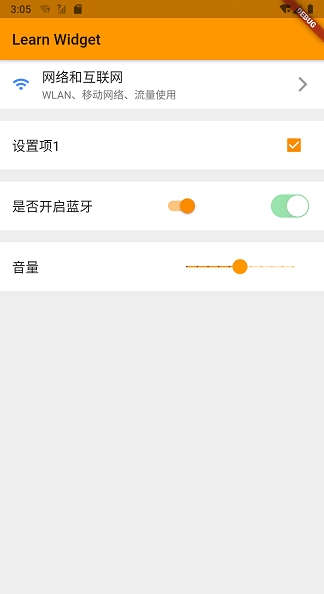
Container(
            color: Colors.grey[200],
            child: Column(
              children: <Widget>[
                Container(
                  padding: const EdgeInsets.symmetric(horizontal: 16),
                  height: 65,
                  color: Colors.white,
                  child: Row(
                    children: <Widget>[
                      Padding(
                        padding: const EdgeInsets.only(right: 16.0),
                        child: Icon(
                          Icons.wifi,
                          color: Colors.blueAccent,
                        ),
                      ),
                      Expanded(
                        child: Column(
                          mainAxisAlignment: MainAxisAlignment.center,
                          crossAxisAlignment: CrossAxisAlignment.start,
                          children: <Widget>[
                            Text(
                              "网络和互联网",
                              style: TextStyle(fontSize: 18),
                            ),
                            Text(
                              "WLAN、移动网络、流量使用",
//                              maxLines: 1,
//                              overflow: TextOverflow.ellipsis,
                              style: TextStyle(color: Colors.grey[600]),
                            )
                          ],
                        ),
                      ),
                      Icon(Icons.arrow_forward_ios,color: Colors.grey,)
                    ],
                  ),
                ),
                Container(
                  height: 65,
                  margin: const EdgeInsets.only(top: 16),
                  padding: const EdgeInsets.symmetric(horizontal: 16),
                  color: Colors.white,
                  child: Row(
                    mainAxisAlignment: MainAxisAlignment.spaceBetween,
                    children: <Widget>[
                      Text("设置项1",style: TextStyle(fontSize: 18),),
                      Checkbox(
                        value: isCheck,
                        onChanged: (val){

                        },
                      ),
//                      Checkbox(
//                        value: isCheck,
//                        onChanged: (val){
//
//                        },
//                      )
                    ],
                  ),
                ),
                Container(
                  height: 65,
                  margin: const EdgeInsets.only(top: 16),
                  padding: const EdgeInsets.symmetric(horizontal: 16),
                  color: Colors.white,
                  child: Row(
                    mainAxisAlignment: MainAxisAlignment.spaceBetween,
                    children: <Widget>[
                      Text("是否开启蓝牙",style: TextStyle(fontSize: 18),),
                      Switch(value: isCheck,onChanged: (val){

                      },),
                      CupertinoSwitch(value: isCheck,)

                    ],
                  ),
                ),
                Container(
                  height: 65,
                  margin: const EdgeInsets.only(top: 16),
                  padding: const EdgeInsets.symmetric(horizontal: 16),
                  color: Colors.white,
                  child: Row(
                    mainAxisAlignment: MainAxisAlignment.spaceBetween,
                    children: <Widget>[
                      Text("音量",style: TextStyle(fontSize: 18),),
                      Slider(
                        value: 50,
                        min: 0,
                        max: 100,
                          divisions:10,
                        onChanged: (val){

                        },
                      )

                    ],
                  ),
                )
              ],
            ),
          )
案例三
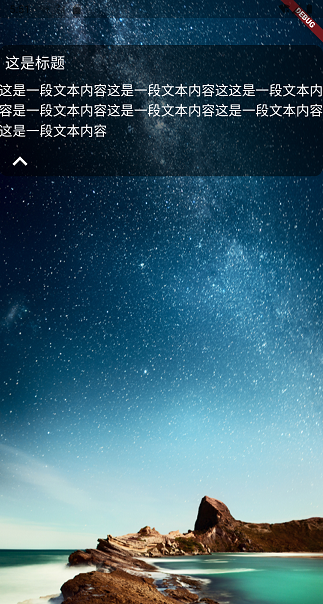
class _HomePageState extends State<HomePage> {
  bool _isShow = false;

  @override
  Widget build(BuildContext context) {
    return Scaffold(
      body: Container(
        alignment: Alignment.topLeft,
        decoration: BoxDecoration(
            image: DecorationImage(
                fit: BoxFit.fill,
                image: NetworkImage(
                    "http://8.pic.pc6.com/thumb/up/2011-12/20111221111636431530_600_0.png"))),
        child: Container(
          width: double.infinity,
          decoration: BoxDecoration(
              borderRadius: BorderRadius.circular(12),
              color: Color.fromRGBO(0, 0, 0, 0.5)),
          margin: EdgeInsets.only(top: 60),
          // 线性布局的主轴默认占满屏幕
          child: Column(
            mainAxisSize: MainAxisSize.min,
            crossAxisAlignment: CrossAxisAlignment.start,
            children: <Widget>[
              Padding(
                padding: const EdgeInsets.all(8.0),
                child: Text(
                  "这是标题",
                  style: TextStyle(color: Colors.white, fontSize: 20),
                ),
              ),

              // 用于控制Widget 是否显示的控件
              Visibility(
                visible: _isShow,
                child: Text("这是一段文本内容这是一段文本内容这这是一段文本内容是一段文本内容这是一段文本内容这是一段文本内容这是一段文本内容",
                    style: TextStyle(color: Colors.white, fontSize: 18)),
              ),

              // onPressed 按钮点击事件回调
              IconButton(icon:Icon(_isShow?Icons.keyboard_arrow_up:Icons.keyboard_arrow_down,size: 40,color: Colors.white),onPressed:(){
                print("onPressed !");
                // 更新屏幕
                setState(() {
                  _isShow = !_isShow;
                });
              })
            ],
          ),
        ),
      ),
    );
  }
}
公众号“编程之路从0到1”