文件与网络
关于Dart 语言中的文件基本操作与网络编程,参看本课程第一季《Flutter 全栈式开发之Dart编程指南》。这里需要关注的,主要是Flutter开发中,对文件路径的处理,以及网络库的使用。
文件
某些时候需要下载或保存文件到手机本地,但由于iOS和Android的文件机制存在很大差别,这时候就需要有一个统一的接口去处理文件的路径问题。
使用第三方库 path_provider
dependencies:
  path_provider: ^1.6.7
该插件库支持访问两个系统文件路径:
- 临时目录:一般用于缓存,系统可以随时清除。 在 iOS 上,这对应于
NSTemporaryDirectory()返回的值,在 Android 上,这是getCacheDir()回的值 - 文档目录:应用程序的目录。用于存储只有本应用可访问的文件。 只有当应用程序被删除时,系统才会清除该目录。 在 iOS 上,对应
NSDocumentDirectory, 在 Android 上是 App Data目录
除此外,该插件库还可获取SD卡的根路径,请注意,只有Android才有SD卡的概念,iOS是没有的,因此不建议使用这种不具备兼容性的API,如果一定要做平台的差异化处理,则应该进行当前平台判断
    try {
      /// 获取临时目录
      var tempDir = await getTemporaryDirectory();
      String tempPath = tempDir.path;
      debugPrint(tempPath);

      /// 获取文档目录
      var appDocDir = await getApplicationDocumentsDirectory();
      String appDocPath = appDocDir.path;
      debugPrint(appDocPath);

      if(Platform.isAndroid){
        /// 获取SD卡目录
        var sDCardDir = await getExternalStorageDirectory();
        String sDCardDirPath = sDCardDir.path;
        debugPrint(sDCardDirPath);
      }

      /// 获取真实路径后,即可通过Dart 标准库中的File来操作
      File file = File(tempPath);
    }catch(err) {
      print(err);
    }
网络
在Flutter 上,更推荐功能强大的 dio 库做网络请求。这里使用dio的3.x版本,注意3.x版本与旧版本不兼容,它能支持web版,建议使用最新版本,关于3.x与旧版本兼容问题,参考 官方文档 从2.1.x升级到 3.x
配置依赖
dependencies:
  dio: ^3.0.9
import 'package:dio/dio.dart';
void getHttp() async {
  try {
    Response response = await Dio().get("http://www.baidu.com");
    print(response);
  } catch (e) {
    print(e);
  }
}
用法示例
导入并创建实例
import 'package:dio/dio.dart';
Dio dio = new Dio();
发起 GET 请求 :
Response response = await dio.get("/test?id=12&name=wendu")
print(response.data.toString());
对于GET请求我们可以将query参数通过对象来传递,上面的代码等同于:
response=await dio.get("/test",queryParameters:{"id":12,"name":"wendu"})
print(response);
发起一个 POST 请求:
response=await dio.post("/test",data:{"id":12,"name":"wendu"})
发起多个并发请求:
response= await Future.wait([dio.post("/info"),dio.get("/token")]);
下载文件:
response=await dio.download("https://www.google.com/",_savePath);
发送 FormData:
FormData formData = new FormData.fromMap({
   "name": "wendux",
   "age": 25,
});
response = await dio.post("/info", data: formData)
如果发送的数据是FormData,则dio会将请求header的contentType设为“multipart/form-data”。
通过FormData上传多个文件:
FormData formData = new FormData.fromMap({
   "name": "wendux",
   "age": 25,
   "file1": new UploadFileInfo(new File("./upload.txt"), "upload1.txt"),
   "file2": new UploadFileInfo(new File("./upload.txt"), "upload2.txt"),
     // 支持文件数组上传
   "files": [
      new UploadFileInfo(new File("./example/upload.txt"), "upload.txt"),
      new UploadFileInfo(new File("./example/upload.txt"), "upload.txt")
    ]
});
response = await dio.post("/info", data: formData)
dio库内部仍然使用HttpClient发起请求,所以代理、请求认证、证书校验等和HttpClient是相同的,可以在onHttpClientCreate回调中设置
(dio.httpClientAdapter as DefaultHttpClientAdapter).onHttpClientCreate = (client) {
    //设置代理
    client.findProxy = (uri) {
      return "PROXY 192.168.1.2:8888";
    };
    //校验证书
    httpClient.badCertificateCallback=(X509Certificate cert, String host, int port){
      if(cert.pem==PEM){
      return true; //证书一致,则允许发送数据
     }
     return false;
    };
  };
更多高级用法,参见dio 中文文档
JSON 生成实体类
目前,服务器与客户端主要使用JSON格式作为数据格式,如果根据服务器的JSON格式手动去编写Dart类,当服务器接口很多时,这就是一件繁重的体力活,因此我们通常使用工具自动完成。
在Flutter开发中,目前有三种方式解决问题
使用 json_serializable 库 手动编写模板生成Dart类,但需要编写代码,不优先考虑
使用Android Studio 工具的插件自动生成,推荐!
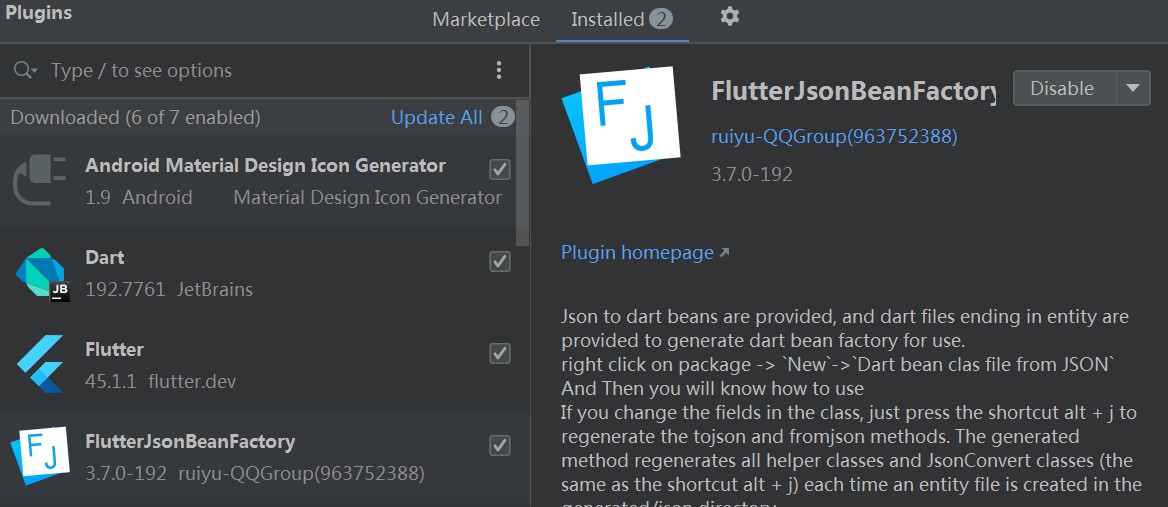
在Android Studio插件商店搜索json并找到插件FlutterJsonBeanFactory 进行安装
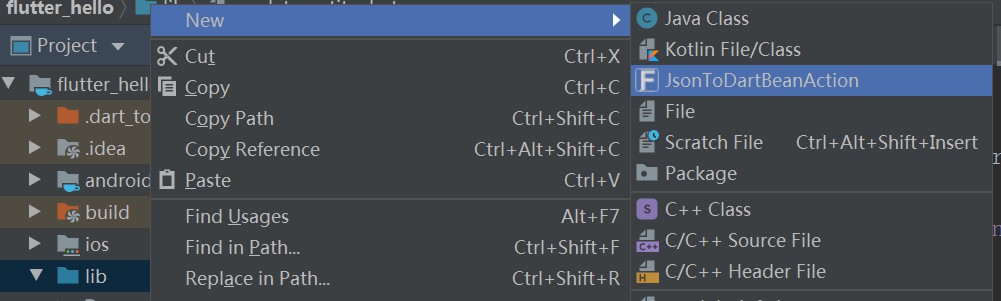
在lib文件夹上点击鼠标右键,选择New,然后选择插件提供的菜单 JsonToDartBeanAction
粘贴如下JSON文本,自动生成对应的实体类
{
    "status": "0000",
    "message": "success",
    "data": {
        "title": {
            "id": "001",
            "name": "白菜"
        },
        "content": [
            {
                "id": "001",
                "value": "这是白菜"
            },
            {
                "id": "002",
                "value": "这是番茄"
            }
        ]
    }
}
WebSocket
在《Flutter 全栈式开发之Dart编程指南》课程中已经学习了WebSocket编程,但是在Flutter中,并不推荐直接使用Dart标准库进行WebSocket请求,一方面是因为使用起来有些繁琐,更重要的另一方面无法直接兼容Web平台。本套课程着重Flutter全栈式开发,因此会更注重代码的兼容性,包括兼容技巧。
这里推荐使用 web_socket_channel
import 'package:web_socket_channel/io.dart';

main() async {
  var channel = IOWebSocketChannel.connect("ws://localhost:8181");
  channel.sink.add("connected!");
  channel.stream.listen((message) {
    // ...
  });
}
公众号“编程之路从0到1”