布局综合案例练习
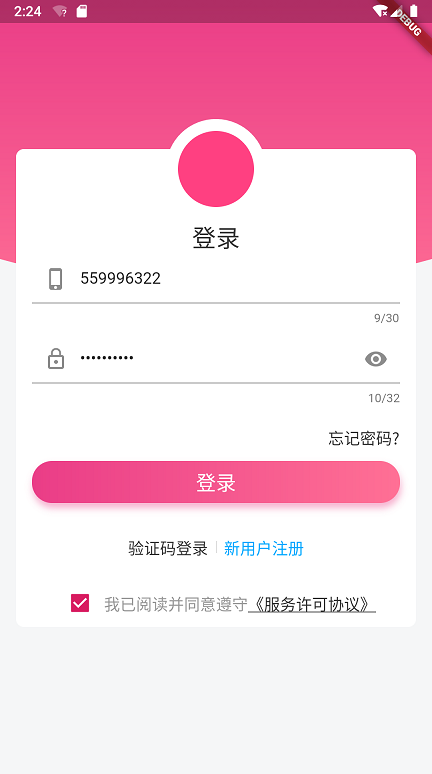
import 'package:flutter/gestures.dart';
import 'package:flutter/material.dart';

import 'view.dart';

class LoginPage2 extends StatefulWidget {
  @override
  _LoginPage2State createState() => _LoginPage2State();
}

class _LoginPage2State extends State<LoginPage2> {
  TextEditingController _phoneNum = TextEditingController();
  TextEditingController _password = TextEditingController();

  TapGestureRecognizer _tapGestureRecognizer;

  GlobalKey<ScaffoldState> _gk = GlobalKey<ScaffoldState>();

  @override
  void initState() {
    super.initState();
    _tapGestureRecognizer = TapGestureRecognizer();
    _tapGestureRecognizer.onTap = myTap;
  }

  void myTap(){
    print("myTap run 。。。。");
  }

  @override
  Widget build(BuildContext context) {
    return Scaffold(
      resizeToAvoidBottomPadding: false,
      key: _gk,
      body: Stack(
        children: <Widget>[
          CurveBgWidget(color: const Color(0xfff5f6f7),),

          Align(
            alignment: Alignment.topCenter,
            child: Container(
              width: 100,
              height: 100,
              margin: EdgeInsets.only(top: 150),
              decoration: BoxDecoration(
                  color: Colors.white,
                  shape: BoxShape.circle
              ),
            ),
          ),

          Container(
            padding: EdgeInsets.only(top: 100,left: 16,right: 16),
            margin: EdgeInsets.only(top: 180,right: 16,left: 16),
            decoration: BoxDecoration(
              color: Colors.white,
              borderRadius: BorderRadius.circular(8)
            ),
            child: Column(
              children: <Widget>[
                TextField(
                  keyboardType: TextInputType.phone,
                  controller: _phoneNum,
                  maxLines: 1,
                  maxLength: 30,
                  decoration: InputDecoration(
                      prefixIcon: Icon(Icons.phone_iphone),
                      hintText: "请输入手机号",
                      contentPadding: EdgeInsets.symmetric(
                          vertical: 10)),
                ),
                Padding(
                  padding: EdgeInsets.only(
                      top: 10, bottom: 20),
                  child: TextField(
                    controller: _password,
                    maxLines: 1,
                    maxLength: 32,
                    obscureText: true,
                    keyboardType: TextInputType.emailAddress,
                    decoration: InputDecoration(
                        prefixIcon: Icon(Icons.lock_outline),
                        hintText: "请输入登录密码",
                        contentPadding: EdgeInsets.symmetric(
                            vertical: 10),
                        suffixIcon: Icon(
                          Icons.remove_red_eye,
                        )),
                  ),
                ),
                Row(
                    mainAxisAlignment: MainAxisAlignment.end,
                    children: <Widget>[
                      Text(
                        '忘记密码?',
                        style: TextStyle(fontSize: 16,color: Color(0xff333333)),
                      )
                    ]),

                InkWell(
                  child: Container(
                    alignment: Alignment.center,
                    margin: EdgeInsets.symmetric(vertical: 12),
                    padding: EdgeInsets.symmetric(vertical: 6),
                    child: Text(
                      '登录',
                      style: TextStyle(
                          fontSize: 20, color: Colors.white),
                    ),
                    decoration: BoxDecoration(
                        gradient: LinearGradient(colors: [
                          const Color(0xFFEA3D87),
                          const Color(0xFFFF7095)
                        ]),
                        borderRadius: BorderRadius.circular(20),
                        boxShadow: [
                          BoxShadow(
                            offset: Offset(1.0, 5.0),
                            color: Color.fromRGBO(234, 61, 135, 0.4),
                            blurRadius: 5.0,
                          )
                        ]),
                  ),
                ),
                SizedBox(height: 20,),

                Row(
                  mainAxisAlignment: MainAxisAlignment.center,
                  children: <Widget>[
                    Text('验证码登录',style: TextStyle(fontSize: 16,color: Color(0xff333333))),

                    Container(
                        height: 12,
                        padding: EdgeInsets.symmetric(horizontal: 8),
                        child: VerticalDivider(width: 0.0,color: Color(0xFFDEDEDE),thickness: 1,)),

                    InkWell(
                      onTap: (){
                      },
                      child: Text('新用户注册',style: TextStyle(
                          fontSize: 16,
                          color: Color(0xFF02A9FF)),),
                    ),
                  ],
                ),
                SizedBox(height: 20,),

                Row(
                  mainAxisAlignment: MainAxisAlignment.center,
                  children: <Widget>[
                    Checkbox(
                      value: true,
                      onChanged: (v){},
                    ),

                    Text.rich(
                        TextSpan(
                            text:'我已阅读并同意遵守',
                            style: TextStyle(
                                fontSize: 16,
                                color: const Color(0xff999999)
                            ),
                            children: [
                              TextSpan(
                                text: '《服务许可协议》',
                                style: TextStyle(
                                    fontSize: 16,
                                    decoration: TextDecoration.underline,
                                    color: const Color(0xff333333)
                                ),
                                recognizer: _tapGestureRecognizer
                              )
                            ]
                        )),
                  ],
                )
              ],
            ),
          ),
          Container(
            alignment: Alignment.topCenter,
            margin: EdgeInsets.only(top: 160),
            child: Column(
              children: <Widget>[
                Container(
                  width: 80,
                  height: 80,
                  decoration: BoxDecoration(
                    shape: BoxShape.circle,
                    color: Colors.pinkAccent
                  ),
                ),
                SizedBox(height: 16,),
                Text("登录")
              ],
            ),
          )
        ],
      ),
    );
  }
}
公众号“编程之路从0到1”